best-ai-tools-for-digital-marketing

Best AI Tools for Digital Marketing Guide For beginners

Best AI for digital marketing can help you stop posting daily without results and start attracting clients with ease. If you’re tired of putting in effort without seeing growth, you’re not alone but here’s the good news: the right AI tools can transform how you create content, run ads, and build your online presence without burning out.

According to HubSpot, 62% of marketers already use AI tools to streamline their workflows and improve consistency, helping them grow their businesses faster.

Today, you will learn step-by-step how to use top AI tools like ChatGPT, Canva , InVideo , and Metricool to supercharge your digital marketing results, even if you’re just starting out.

Ready? Let’s dive in.


What Is Digital Marketing in 2025? (Key Insights) Best Ai Tools

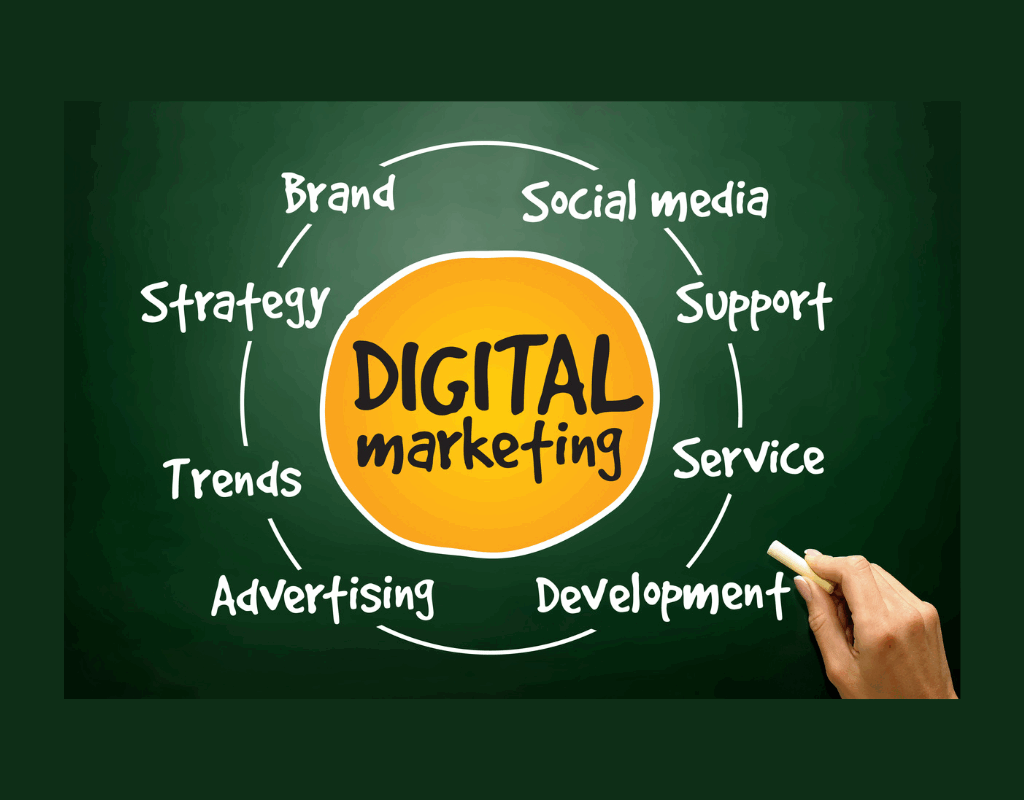
Digital marketing in 2025 isn’t about posting randomly; it’s about smart strategies powered by AI. Here’s what it now includes:

1️⃣ SEO: Drive Free Traffic with AI Assistance

Using AI tools like NeuronWriter and Surfer SEO, you can:

✅ Generate keyword-rich outlines.
✅ Optimize headings and internal linking for higher rankings.
✅ Find low-competition keywords faster.

2️⃣ Content Marketing: Create Value That Attracts

Instead of churning out random content, AI allows you to:

✅ Research trending topics using ChatGPT.
✅ Draft blog posts that resonate with your audience.
✅ Repurpose content across multiple platforms.

3️⃣ Social Media Marketing: Build Trust and Community

Using AI for digital marketing helps you:

✅ Schedule posts with tools like Metricool.
✅ Design eye-catching graphics with Canva AI.
✅ Generate hashtags and captions quickly.

4️⃣ Email Marketing: Retain and Convert Customers

AI-powered tools like Mailchimp AI can:

✅ Draft personalized email sequences.
✅ Segment your audience automatically.
✅ Track open rates and conversions.


Why Most Beginners Struggle Without Using The Best AI tools for Digital Marketing

Here’s the hard truth:

❌ Posting without strategy leads to frustration.
❌ Content inconsistency hurts your brand.
❌ Manual editing and research drain your energy.

By integrating AI into your digital marketing, you:

✅ Save time and mental energy.
✅ Stay consistent across platforms.
✅ Create professional content even as a beginner.


Best AI Tools for Digital Marketing (Key Tools You Need)

Below are the best AI for digital marketing tools you can start using immediately:

✅ ChatGPT (Content Creation & Research)

Use ChatGPT to:

  • Generate blog post outlines and scripts.
  • Write captions for Instagram, Facebook, and LinkedIn.
  • Brainstorm content ideas for your niche.

Pro Tip: Add your personal touch to maintain authenticity.


✅ Canva AI (Graphic Design)

Design scroll-stopping graphics for social media, blogs, and ads using Canva AI’s Magic Design.

Learn how here: Canva AI Magic Design


✅ InVideo AI (Video Content)

Turn your scripts into engaging videos for YouTube Shorts, TikTok, and Instagram Reels, even if you’re a beginner.

Try it: InVideo AI


✅ Metricool & Publer (Scheduling & Analytics)

These tools help you:

✅ Auto-publish your content.
✅ Track analytics to see what works.
✅ Plan your calendar for consistent posting.


✅ Pika Labs (Animations)

Want quick, eye-catching animations? Pika Labs helps you generate animated posts that capture attention.


Step-by-Step Guide: Best Ai Tools for Digital Marketing

Ready to implement your first campaign using the best AI for digital marketing? Follow this workflow:

1 Pick Your Niche

Example: “Social Media Marketing for Restaurants.”

2 Use ChatGPT

Generate 10 blog post topics and catchy social media captions.

3 Canva AI

Design branded graphics for posts, stories, and ads.

4 InVideo AI

Turn your captions or blog summaries into short videos for Reels or Shorts.

5 Metricool or Publer

Schedule your posts to publish automatically.

6 Track Results

Check which posts generate traffic, clicks, and leads.


Advanced AI Strategies to Scale Your Marketing (Key Tactics)

As you grow, try these advanced strategies:

✅ Use AI to automate lead nurturing through chatbots.
✅ Run A/B tests using AI analytics for ads.
✅ Use AI trend analysis for content creation.
✅ Create multilingual content to reach new audiences.


Case Study: How AI Helped Me Grow Traffic 5x (Real Example)

When I implemented AI-powered blogging and social media marketing using ChatGPT, Canva AI, and Metricool, I:

✅ Created 12 high-quality blog posts in 1 month.
✅ Designed graphics in half the time.
✅ Automated posting, which grew my page views from 200 to 1000+ weekly.


Common Mistakes When Using Best AI Tools For Digital Marketing

⚠️ Relying fully on AI-generated content without editing.
⚠️ Ignoring fact-checking outputs.
⚠️ Losing your brand voice.
⚠️ Not reviewing analytics to improve.


Best Practices for Using Best AI tools for Digital Marketing

✅ Use AI as your assistant, not your replacement.
✅ Maintain your unique voice in every post.
✅ Be consistent with your posting schedule.
✅ Combine AI speed with human creativity.


How to Monetize AI + Digital Marketing Skills (Key Income Paths)

After mastering the best AI for digital marketing, you can:

✅ Start a freelance agency for small businesses.
✅ Sell SEO and content creation services.
✅ Become a UGC creator using AI for content.
✅ Launch digital products or courses.
✅ Monetize your blog with AdSense.


FAQs About the Best AI Tools for Digital Marketing

Q: Is AI content safe for SEO?
Yes, if you edit and add value to avoid duplicate content issues.

Q: What is the best AI for digital marketing beginners?
ChatGPT for writing, Canva AI for design, and Metricool for scheduling.

Q: Can I replace human writers with AI?
AI speeds up writing, but human editing ensures quality and authenticity.

Q: Is it expensive to start with AI tools?
Many tools like Canva, ChatGPT, and Metricool offer free plans for beginners.


Final Words: Get Started with the Best AI tools for Digital Marketing Today

Mastering the best AI for digital marketing is your cheat code to growing your business faster and smarter in 2025.

If you need help setting up your AI-powered marketing systems or learning to use these tools for your business, contact me here for a free strategy session.


Related Resources:

TikTok Ads: How to Run TikTok Ads for Sales Conversion
Google Ads Manager: Google Ads & Adsense Monetization
Meta Ads Manager: Master Facebook Ads Massive Traffic & Sales


Was this guide helpful? Share your thoughts in the comments or send this post to a friend who wants to grow using AI!

google-ads-manager

Google Ads Manager: Google Ads & Adsense Monetization

In today’s digital battlefield, every entrepreneur and content creator dreams of scaling their visibility using Google Ads, but the cost barrier feels impossible. What if you could run Google Ads without using your money by strategically leveraging Google Ads Manager, ad credits, and a layered content strategy to self-fund your campaigns?

This guide will walk you step-by-step through verifying your business, setting up your Google ecosystem, crafting a money-making content machine, and strategically using Google Ads Manager to fuel ads without draining your wallet.

It’s a full, practical system you can bookmark, apply, and share.


Table of Contents

  1. Why Running Google Ads Without Using Your Money Matters
  2. Step 1: Verify Your Business with Google
  3. Step 2: Google Ad Account Setup Using Google Ads Manager
  4. Step 3: Connect Google Business to Social Media
  5. Step 4: Domain, Hosting, and Blog Setup
  6. Step 5: Install Yoast SEO for Ranking
  7. Step 6: Setup Google Analytics, Search Console, and Tag Manager
  8. Step 7: Setup Google AdSense to Monetize
  9. Step 8: Content Strategy to Self-Fund Google Ads
  10. Step 9: Deep Google Ads Manager Campaign Setup
  11. Step 10: Advanced Optimization and Performance Mixing
  12. Case Studies: Real Examples of Self-Funding Google Ads
  13. Checklist: Your No-Money Google Ads Launch Plan
  14. Final Thoughts and CTA

Why Running Google Ads Without Using Your Money Matters

Running Google Ads efficiently can accelerate your business, but ad spend can eat your budget. By leveraging Google Ads Manager, content monetization, and available ad credits, you can:

  • Generate leads on autopilot.
  • Scale your business visibility.
  • Fund your ads through your content and affiliate systems.
  • Keep your personal or startup budget intact.


Step 1: Verify Your Business with Google

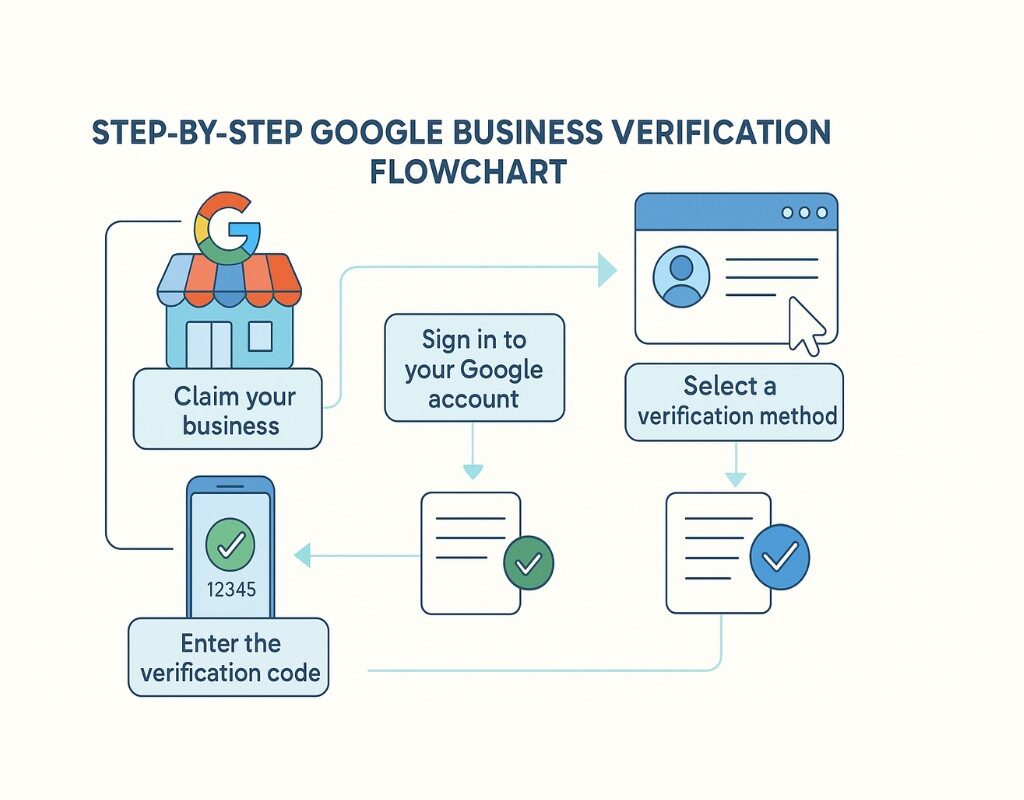
Before running ads, ensure your business is verified with Google:

  1. Go to Google Business Profile.
  2. Add your business details, address, and services.
  3. Request postcard or phone verification.
  4. Once verified, your business will appear on Google Maps and Search.

Pro Tip: A verified business boosts trust and eligibility for ad credits.


Step 2: Google Ad Account Setup Using Google Ads Manager

  1. Go to Google Ads Manager.
  2. Create your Google Ads account.
  3. Add your billing details, but opt for promo code use (search for available $100-$500 credits).
  4. Organize your ad account with clear naming conventions (e.g., [Brand]-Search-Conversion).
  5. Link your Google Business Profile to your ad account.

Focus Keyword Usage: Ensure your ad account structure aligns with your Google Ads Manager planning for scalable campaigns.


Step 3: Connect Google Business to Social Media

  1. Link your Google Business Profile to Facebook and Instagram.
  2. Sync your posting for cross-platform visibility.
  3. Enable messaging for leads capture.
  4. Collect reviews to enhance local rankings and ad relevance.

Best Practice: Regularly update photos and posts to keep your listing active.


Step 4: Domain, Hosting, and Blog Setup

To fund your ads, you need traffic-generating content:

  1. Purchase a domain (Namecheap, GoDaddy, or Google Domains).
  2. Get reliable hosting (SiteGround, Hostinger, Cloudways).
  3. Install WordPress.
  4. Create a clean, fast-loading theme.
  5. Set up essential pages: About, Contact, Services, Blog.

Step 5: Install Yoast SEO for Ranking

Ranking is critical to generating organic traffic to fund your ads:

  1. Install and configure Yoast SEO.
  2. Set focus keywords for each post.
  3. Use structured headings, slugs with focus keywords, and SEO-friendly meta descriptions.
  4. Add image alt texts using your focus keyword.

Step 6: Setup Google Analytics, Search Console, and Tag Manager

  1. Google Analytics: Track user behaviors, bounce rates, and conversions.
  2. Google Search Console: Monitor indexing and keyword rankings.
  3. Google Tag Manager: Manage all tracking codes without bloating your site.

Step 7: Setup Google AdSense to Monetize

Running ads without using your money means you need revenue inflow:

  1. Apply for Google AdSense.
  2. Place ad codes on your high-traffic pages.
  3. Optimize placements for higher CPC.

Pro Tip: Use your blog to generate $5-$20/day, which can fund your initial ad campaigns.


Step 8: Content Strategy to Self-Fund Google Ads

Why Long-Form Content?

Long-form (3000-5000 words) blog posts:

  • Rank for multiple keywords.
  • Build authority in your niche.
  • Attract AdSense and affiliate revenue.
  • Drive organic traffic for retargeting.

Strategy:

  • Target low-competition, high-intent keywords.
  • Post 1-2 long-form blogs weekly.
  • Include CTAs for email collection.
  • Interlink articles for SEO boost.

Step 9: Deep Google Ads Manager Campaign Setup

Now you are ready to run Google Ads without using your money.

Key Areas of Google Ads Manager:

  • Billing Overview: Track promo credits and AdSense funding.
  • Campaign Creation:
    • Search Ads for high-intent keywords.
    • YouTube Ads for visual reach.
    • Display Ads for retargeting site visitors.
  • Performance Mix: Analyze which ad type brings the best ROI.

Setup Steps:

  1. Define campaign goals (leads, traffic, conversions).
  2. Build high-converting landing pages.
  3. Write compelling ad copy.
  4. Add negative keywords to filter irrelevant clicks.
  5. Optimize bidding strategy.

Step 10: Advanced Optimization and Performance Mixing

Best Practices vs. Outdated Practices

Best PracticesOutdated Practices
Using SKAGs or SCAGs for precisionBroad targeting without exclusions
Layered retargeting with YouTubeRunning single campaign types only
Using conversion trackingNo conversion tracking
Automated rules for scalingManual bid guessing

Pro Tips:

  • Use automated rules to pause underperforming ads.
  • Test different ad creatives every 2 weeks.
  • Split test landing pages.
  • Use remarketing lists for search ads (RLSA).

Case Studies: Real Examples of Self-Funding Google Ads

Case Study 1: Blogger Monetizing Traffic

A personal finance blogger grew to 50,000 pageviews, earning $700/month from AdSense, using those funds to run Google Search Ads for a paid course funnel.

Case Study 2: Small Business Using Ad Credits

A local HVAC business used $500 Google Ads credits to run call-only campaigns, converting five $2000 clients, reinvesting profits into ongoing ads.

Case Study 3: YouTube Content Funnel

A YouTube channel ran low-cost YouTube Ads funded by affiliate commissions, driving 10,000 subscribers in 6 months.

Visual: (Embed your “Case Study Results and Traffic-to-Ad Flow” graphic here)


Final Thoughts

Running Google Ads without using your money isn’t a gimmick it’s a systematic, layered approach using Google Ads Manager combined with strategic content monetization. By following this guide, you can fund your business growth, build authority, and generate consistent traffic without draining your savings.

Ready to launch your first fully funded Google Ads campaign? Contact Us

✅ Have questions? Drop them in the comments, and we will personally guide you on your no-money Google Ads journey.

✅ Share this guide with fellow entrepreneurs looking to scale without financial strain.

meta-ads-manager

Meta Ads Manager: Master Facebook Ads Massive Traffic & Sales


Table of Contents (20 Sections)

  1. Introduction: Why Meta Ads Manager Still Dominates in 2025
  2. What is Meta Ads Manager? An Updated Breakdown
  3. Why Most Brands Fail with Facebook Ads
  4. Preparing Your Meta Ads Account for 2025
  5. The Meta Pixel & Conversions API Setup
  6. Structuring Campaigns for Scalable Growth
  7. Understanding Campaign Budget Optimization (CBO)
  8. Advanced Audience Targeting in 2025
  9. Winning Creative Strategies for Facebook Ads
  10. Retargeting: Beyond the Basics
  11. Bid Strategies: Cost Cap vs. Bid Cap vs. Lowest Cost
  12. A/B Testing Frameworks for Ads
  13. Budget Scaling: Vertical & Horizontal Methods
  14. Analyzing Data & Key Metrics in Meta Ads Manager
  15. Using Breakdown Reports Effectively
  16. Preventing Creative Fatigue
  17. Troubleshooting Underperforming Campaigns
  18. Advanced Tactics: Leveraging Automation & AI
  19. Real Case Studies from Brands Winning with Meta Ads
  20. Conclusion & Next Steps: Building a Sustainable Funnel

1️⃣ Introduction: Why Meta Ads Manager Still Dominates in 2025

Meta Ads Manager remains the most powerful performance marketing platform globally for traffic and customer acquisition. It combines unmatched audience reach, sophisticated targeting, and advanced AI-powered delivery to help brands scale profitably.

Yet, many brands waste budgets, misinterpret data, or fail to adapt to creative-first performance marketing trends. As algorithmic learning improves, creative and structured testing will determine winners vs. brands that “boost posts” and hope for results.


2️⃣ What is Meta Ads Manager? An Updated Breakdown

Meta Ads Manager is your control center for Facebook, Instagram, Messenger, and Audience Network ads. It allows you to:

✅ Create campaigns and ad sets
✅ Manage targeting, placements, and budgets
✅ Analyze performance data
✅ Optimize based on results

In 2025, its automation and AI-powered bidding capabilities have evolved, requiring a strategic approach rather than brute-force ad spend.

🔗 Official Meta Business Help


3️⃣ Why Most Brands Fail with Facebook Ads Using Meta Ads Manager

Despite Meta’s power, most advertisers fail due to:

  • Poor tracking setup
  • No systematic creative testing
  • Weak landing pages
  • Ignoring funnel-based retargeting
  • Making reactive, emotion-based decisions

“Success with Meta Ads requires consistency, creative strategy, and data-led iteration.”


4️⃣ Preparing Your Meta Ads Manager Account for 2025

Before spending $1:
✅ Create a Meta Business Porfolio
✅ Create a Prepaid Ad account In The meta business porfolio
✅ Set up Meta Pixel (Dataset & events and Conversions API)
✅ Create and organize custom audiences
✅ Define KPIs and reporting structure

This foundation ensures algorithm signals are clear and conversions are tracked accurately.


5️⃣ The Meta Pixel & Conversions API Setup

Pixel: Tracks browser-based events like page views, add-to-carts, and purchases.
Conversions API: Sends server-based event data, bypassing browser restrictions (iOS, ad blockers).

Using both ensures accurate event tracking, feeding the algorithm cleaner data to improve delivery optimization.


6️⃣ Structuring Campaigns for Scalable Growth

Follow this simplified structure:

  • 1 Campaign (CBO enabled)
  • 3-5 Ad Sets (different audiences)
  • 3-5 Ads per Ad Set (testing creatives)

This structure is easy to scale while maintaining control for data-driven decisions.


7️⃣ Understanding Campaign Budget Optimization (CBO)

CBO distributes your budget across ad sets based on performance signals, letting the algorithm push spend toward what’s working without manual micromanagement.

Benefits:
✅ Easier to scale
✅ Efficient budget allocation
✅ Faster learning phase


8️⃣ Advanced Audience Targeting in 2025

Effective targeting in 2025 includes:
✅ Broad targeting with open interests to leverage AI
✅ Lookalike audiences of high-value customers
✅ Custom audiences for retargeting site visitors, engagers, and buyers
✅ Dropping Pin To Precise Exclusive Location 1 MIlie Radius


9️⃣ Winning Creative Strategies for Facebook Ads

Creative is now the #1 lever for reducing CPA and increasing ROAS.

Winning elements:

  • Hook within the first 3 seconds
  • Use of UGC-style, native video
  • Clear, benefit-driven CTA
  • Square or vertical formats for mobile
  • Story-based creatives over hard-sell

“Great creative outperforms targeting tweaks 10x.”


10 Retargeting: Beyond the Basics

Warm audiences convert cheaper. Retarget:
✅ 7-day site visitors
✅ 3-day add-to-cart visitors
✅ 14-day video viewers and engagers
✅ Exclude recent buyers for efficiency

Utilize dynamic product ads to match users with products they viewed.


11 Bid Strategies: Cost Cap vs. Bid Cap vs. Lowest Cost

  • Lowest Cost: Good for testing and learning phase.
  • Cost Cap: Allows you to control your CPA target at scale.
  • Bid Cap: Advanced control for high-budget accounts needing consistent CPA.

12 A/B Testing Frameworks for Meta Ads Manager

Effective testing involves:
✅ One variable at a time (headline, creative, audience)
✅ Consistent budgets during tests
✅ Clear KPIs (CTR, CPA, ROAS)
✅ Sufficient data before decisions


13 Budget Scaling: Vertical & Horizontal Methods

Vertical Scaling: Increase budget by 20-30% every 3 days on winning ad sets.

Horizontal Scaling: Duplicate winners to new audiences or locations without disrupting learning.


14 Analyzing Data & Key Metrics in Meta Ads Manager

Core metrics:
✅ CTR (Click-Through Rate)
✅ CPC (Cost Per Click)
✅ CPA (Cost Per Acquisition)
✅ ROAS (Return on Ad Spend)
✅ Frequency (to monitor fatigue)

Review weekly, not hourly, for meaningful trends.


15 Using Breakdown Reports Effectively

Break down data by:
✅ Age
✅ Gender
✅ Placement (Feed, Stories, Reels)
✅ Device

This reveals hidden opportunities to allocate spend effectively.


16 Preventing Creative Fatigue

Rotate creatives every 2-4 weeks. Monitor frequency (keep under 2.5 where possible) and refresh top-performing angles with slight variations.


17 Troubleshooting Underperforming Campaigns

  • High CPC? Weak creatives; test new hooks.
  • Low CTR? Weak headline/visual; test scroll-stopping visuals.
  • High CPA? Refine targeting or landing page.
  • Low ROAS? Optimize offer or creative clarity.

18 Advanced Tactics: Leveraging Automation & AI

  • Dynamic Creative Testing: Auto-mix images, headlines, and text.
  • Automated Rules: Pause ads if CPA exceeds a threshold.
  • Advantage+ Campaigns: Let Meta find buyers across audiences.

19 Real Case Studies from Brands Winning with Meta Ads

E-commerce brand: Reduced CPA by 37% by focusing on UGC-style creatives and broad targeting.
SaaS business: Lowered CAC 42% using Cost Cap bidding paired with lookalike audiences of engaged users.
Local business: Tripled lead volume using retargeting and Messenger ads with personalized creatives.


20 Conclusion & Next Steps: Building a Sustainable Funnel

Meta Ads Manager in 2025 remains a predictable, scalable channel for customer acquisition when used systematically.

Action Plan:
✅ Audit your account structure and pixel setup.
✅ Create a structured testing plan for creatives and audiences.
✅ Focus on data-driven scaling while managing budgets strategically.
✅ Track key metrics, adjust, and maintain creative freshness.

“Meta Ads success is built on consistency, iteration, and understanding your customer’s journey.”


💡 Bonus: Advanced Tactics for Mastery

✅ Combine email retargeting with Meta Ads for nurturing.
✅ Layer creative angles for seasonal campaigns.


Ready to scale your traffic and sales with Meta Ads Manager? Book a consultation call, or subscribe to our weekly growth newsletter for advanced tactics.

promote-website

Promote Website for More Traffic: Advanced Strategies

Why Promoting Your Website Requires a New Approach

Promote website with purpose not just to have an online presence, but to stand out and make an impact. You built your website to showcase your expertise, attract the right audience, and grow your brand. But in 2025, effective promotion goes far beyond social media posts or keyword stuffing. The digital landscape has shifted, and your approach must be smarter, more strategic, and tailored to today’s audience.

“You don’t need more content. You need content that gets seen, remembered, and shared.”

In this comprehensive guide, you’ll learn how to promote your website using 21 advanced, actionable strategies, backed by examples, layered frameworks, and your custom visuals to ensure you get real, sustainable traffic that converts.


Table of Contents

  1. The Traffic Landscape: What’s Changed
  2. Create Content Worth Promoting
  3. Advanced SEO: Go Beyond Basics
  4. Content Repurposing Power
  5. Visual Content & Infographics
  6. Leveraging Email Marketing
  7. Strategic Guest Posting & Collaborations
  8. Social Media Amplification
  9. Paid Traffic with Precision
  10. Building Community for Organic Promotion
  11. Harnessing User-Generated Content
  12. Leveraging Influencers & Micro-Collaborations
  13. Utilizing Podcast & Video SEO
  14. Advanced Internal Linking
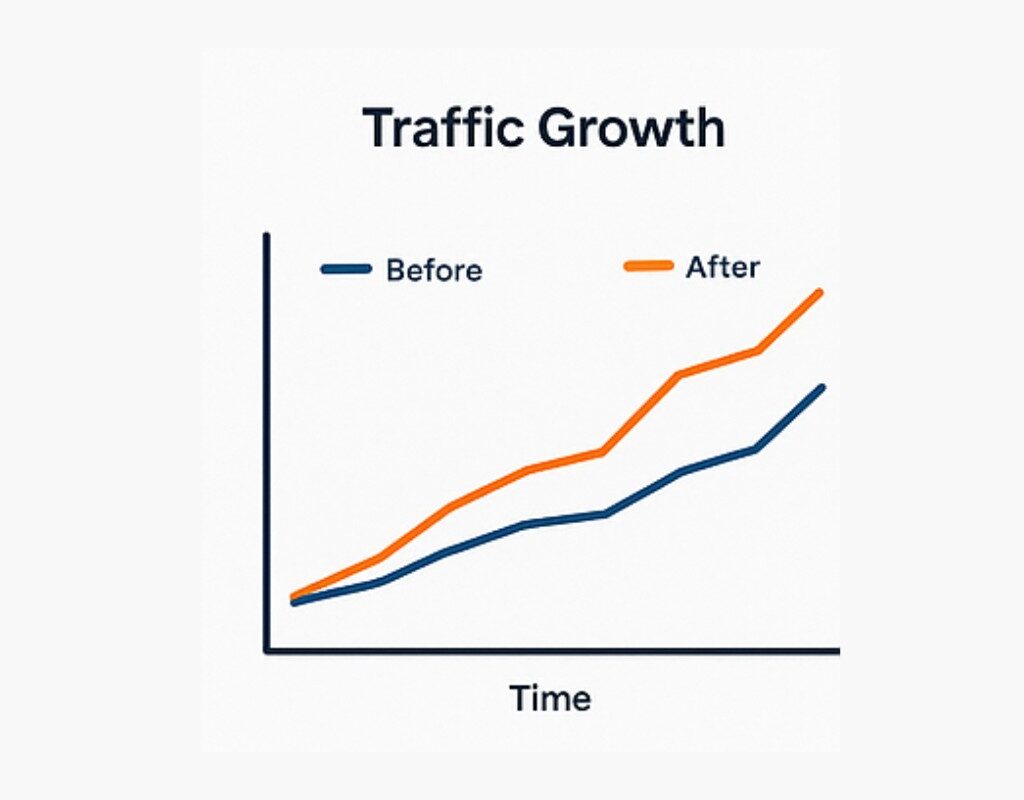
  15. Real Case Study: Traffic Growth Breakdown
  16. Measuring & Analyzing Traffic
  17. Avoiding Thin Content & Content Decay
  18. Promoting Evergreen vs. Trending Content
  19. Using Interactive Tools to Drive Traffic
  20. Creating Bookmark-Worthy Content Hubs
  21. The Mindset for Sustainable Traffic

1️⃣ The Traffic Landscape: What’s Changed to promote website

In 2015, ranking for a keyword often meant writing a 500-word blog post, stuffing a few keywords, and getting backlinks from directories. In 2025, the game is different:

  • User intent dominates; Google prioritizes comprehensive content that answers layered questions.
  • SERP features (videos, snippets, FAQs) take space from classic blue links.
  • Social algorithms favor engagement and retention over reach.
  • AI-generated content floods low-quality spaces, making authenticity a ranking factor.

2️⃣ Create Content Worth Promoting

Before you promote your website, ensure it deserves promotion.

How?

Deep Research: Go beyond surface-level articles. Interview experts, run your own tests, and use unique data.
Layered Content: Add examples, case studies, infographics, and videos to retain attention.
Actionability: Readers should leave your page knowing exactly what to do next.
Upgraded Visuals: Your 3D logo-style visuals and infographics enhance credibility and retention.

Example: We replaced a generic “SEO Tips” post with a 3,500-word layered guide with examples, charts, and embedded tutorial videos. Bounce rate dropped by 42%, and shares increased 3x within two weeks.


3️⃣ Advanced SEO: Go Beyond Basics to promote website

While keywords are essential, advanced promotion requires:

Topic Clustering: Interlink related articles to build topical authority.
Schema Markup: Use FAQ, How-To, and Product schema to dominate SERPs.
Snippet Optimization: Answer questions in clear, concise blocks to win featured snippets.
Page Experience: Google’s Core Web Vitals affect rankings and user retention.


4️⃣ Content Repurposing Power to promote website

Creating a single high-quality post allows you to generate:

  • 3 YouTube shorts
  • 5 Instagram carousel posts
  • 7 LinkedIn posts
  • 1 Slide deck
  • 1 podcast discussion
  • 1 email newsletter

Repurposing Example: After publishing your long-form guide, transform each section into short videos with captions, post reels summarizing tips, and embed snippets in your email list. This approach maximizes visibility while respecting your time.


5️⃣ Visual Content & Infographics to promote website

Visuals break the wall of text and improve retention rates by up to 80%. Your readers skim, but visuals help them stop and engage.

✅ Create data-backed infographics for Pinterest, LinkedIn, and your post.
✅ Use comparison tables to illustrate choices.
✅ Share carousel visuals on Instagram to drive traffic back to your site.


6️⃣ Leveraging Email Marketing to promote website

Your email list is your traffic engine. Why?

  • It’s algorithm-proof.
  • You own the audience.
  • Email marketing has the highest ROI across channels.

Steps:

✅ Offer lead magnets (toolkits, checklists, webinars).
✅ Segment your list based on user behavior.
✅ Nurture with valuable, actionable newsletters linking back to your articles.
✅ Add personalized CTAs to drive targeted traffic.


7️⃣ Strategic Guest Posting & Collaborations

Guest posting is not dead when done strategically.

✅ Target niche-relevant, high-authority sites.
✅ Pitch unique angles with layered expertise.
✅ Include contextual backlinks, not just author bio links.
✅ Share your guest posts across your channels for additional reach.

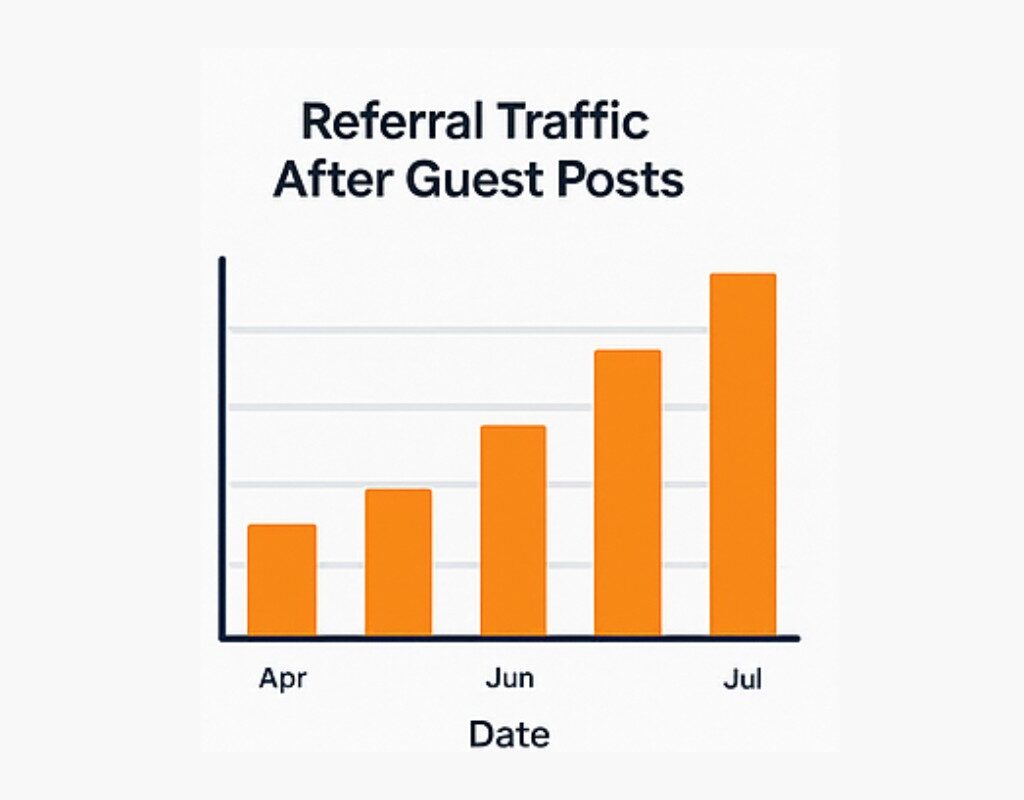
Real Data: One guest post on a top-tier niche site brought 3,200 targeted visitors, with a 22% conversion rate to our lead magnet.


8️⃣ Social Media Amplification to promote website

Stop posting only link drops. Instead:

✅ Use threads on X/Twitter to summarize insights and link back.
✅ Reels and shorts for micro-tips with a CTA to your post.
✅ Host live Q&A sessions around your blog’s topic to direct traffic.
✅ Schedule consistent promotion using tools like Buffer, Publer, or Hypefury.


9️⃣ Paid Traffic with Precision

If you have a high-performing post, amplify it using:

Facebook Ads for retargeting visitors who engaged but didn’t convert.
Pinterest Promoted Pins for evergreen posts.
Google Ads for high-intent keywords linked to lead magnets.

Track ROAS (Return on Ad Spend), starting small and scaling what works.


10 Building Community for Organic Promotion

A loyal community shares your content organically. Build:

✅ A private Discord or Slack for your audience.
✅ Facebook Groups for discussion.
✅ Interactive webinars with Q&A sessions.


11 Harnessing User-Generated Content

Encourage your audience to:

✅ Share testimonials of your products/services.
✅ Create case studies using your strategies.
✅ Share photos/videos using your tools.

Repost these with permission, tagging them to build trust and attract similar users.


12 Leveraging Influencers & Micro-Collaborations

Micro-influencers (1,000-10,000 engaged followers) can drive highly targeted traffic affordably.

✅ Partner on content collaborations, Instagram Lives, or YouTube features.
✅ Send them your resource/toolkit for a genuine review.


13 Utilizing Podcast & Video SEO to promote website

Podcasts are high-authority, low-competition channels for promoting your website.

✅ Create short clips linking back to your posts.
✅ Use show notes with keyword-rich links.
✅ Repurpose blog sections into podcast topics.


14 Advanced Internal Linking

Interlink your pillar posts with supporting articles using relevant anchor texts, creating a web of content that boosts rankings.


15 Real Case Study: 3X Traffic in 6 Months

Challenge: Low organic traffic, high bounce rate.
Solution: Created layered pillar content, upgraded visuals, implemented SEO schema, launched lead magnets, and repurposed content for LinkedIn.
Result: Organic traffic tripled in 6 months; bounce rate decreased by 47%; lead generation increased by 35%.


16 Measuring & Analyzing Traffic

Use:

Google Search Console: Track queries and ranking positions.
Google Analytics: Track behavior flow, bounce rates, and top pages.
Hotjar/Clarity: Understand user interactions through heatmaps.


17 Avoiding Thin Content & Content Decay

Thin content hurts rankings. Refresh your old posts with:

✅ Updated stats and examples.
✅ Visuals and videos.
✅ Better structure and internal linking.


18 Promoting Evergreen vs. Trending Content

✅ Use evergreen posts for consistent traffic.
✅ Use trending posts for spike traffic, linking back to evergreen posts to capture long-term visitors.


19 Using Interactive Tools to Drive Traffic

Add:

✅ Calculators.
✅ Quizzes.
✅ Interactive checklists.

These increase time on page and encourage shares.


20 Creating Bookmark-Worthy Content Hubs

Turn your blog into a resource hub with:

✅ Master guides.
✅ Downloadable toolkits.
✅ Templates.
✅ Curated lists of valuable resources.


21 The Mindset for Sustainable Traffic

Promoting your website isn’t a “post once, go viral” strategy. It’s a consistent, layered process that compounds over time.

✅ Keep testing and iterating.
✅ Stay updated with platform changes.
✅ Serve your audience relentlessly.


Conclusion: Your Next Step to Promote Website

You now have 21 advanced, layered strategies to promote your website and drive meaningful traffic that converts.

🚀 Ready to take action? Contact Us Start by picking three strategies from this list to implement this week.

e-commerce-website

E-commerce Website Marketing Integration

Why Just Having an E-Commerce Website Isn’t Enough

In today’s hyper-competitive digital marketplace, simply having an online store won’t cut it. With millions of e-commerce sites competing for your customer’s attention, the real game-changer is how well your website and marketing work together.

Think of your website as your storefront but your marketing is the magnet that pulls people in. The tighter the connection between your website, SEO, content strategy, automation, and customer experience, the better your results.

In this guide, you’ll discover practical ways to integrate your e-commerce website with modern marketing tactics, helping you drive more traffic, boost conversions, and build a brand that stands out in a crowded market. Whether you’re a solo entrepreneur or scaling a fast-growing brand, these insights will equip you to grow smarter, not harder.


Why Integration Matters: The New E-Commerce Ecosystem

A modern e-commerce website isn’t just a static storefront it’s a living, breathing sales machine that attracts, engages and converts at every stage.

According to a 2024 Statista report , global e-commerce sales will hit $6.3 trillion by the end of 2025. But here’s the thing: 70% of carts are abandoned and customer retention is super low for brands without proper marketing integration.

What Does Real Integration Look Like? ✅ SEO brings targeted traffic to your product pages. ✅ Email campaigns are triggered by on-site behavior like cart abandonment. ✅ Social ads retarget visitors who viewed specific products but didn’t buy. ✅ Blog content aligns with real-time customer data and seasonal demand.

Without this integration, your marketing is just shouting into the void. With it, you have a conversation with your customers that builds trust, converts and drives repeat sales.


E-commerce The Old Way vs. The Integrated Way

Let’s take a look at a quick comparison to show how things have evolved:

ElementOld-School E-CommerceIntegrated E-Commerce Experience
Marketing ToolsSiloed apps and manual effortUnified platforms with automation
Content StrategyStatic product descriptionsDynamic blogs, videos, and user-generated content
Customer EngagementEmail blastsPersonalized messaging based on behavior
Sales FunnelGeneric and linearMulti-touch, data-informed journeys
Performance TrackingGoogle Analytics onlyFull-funnel analytics integrated in CMS

Integration not only saves time but also ensures you’re speaking to the right audience at the right moment, every time.


Key Strategies to Integrate Marketing into Your E-commerce Website

1. SEO is Your Foundation Optimize Intelligently

SEO isn’t just a marketing tactic; it’s the foundation of your e-commerce website’s visibility. If customers can’t find you, they can’t buy from you.

Start by adding focus keywords like “e-commerce website” and your product specific keywords into:

✅ Page titles and meta descriptions ✅ Product descriptions and category pages ✅ Blog posts and FAQs ✅ Image alt-text for every product image

Use Ahrefs and SEMRush to track your keyword performance and see how your competitors rank to spot quick wins.

Pro tip: SEO isn’t just about rankings; it’s about relevance and readability. Write for your customers first and make it easy for Google to understand your pages.


2. Content That Converts Not Just Fills Space

Content marketing goes beyond blogging. When integrated correctly, it drives conversions directly from your e-commerce website.

Types of content that work best:

  • How-to guides on product usage
  • Customer stories or case studies
  • Comparison posts (e.g., Product A vs. Product B)
  • Seasonal gift guides

These not only improve SEO but also educate and build trust with potential buyers. Using a CMS like Shopify, WooCommerce, or BigCommerce makes publishing and linking blog content to product pages seamless.

Pro Tip: Add internal links within blog posts that drive to related products or categories.


3. Email Marketing Automation: Precision over Volume

Email is still the most profitable marketing channel, with a $36 return for every $1 spent according to Litmus. But manual emails won’t cut it.

Key automated email workflows:

  • Welcome Series: Introduce your brand and top products.
  • Abandoned Cart: Triggered reminders to recover sales.
  • Post-Purchase Follow-ups: Upsells, reviews, and support.
  • Re-engagement Series: Win back inactive customers.

Tools like Klaviyo, Mailchimp, or Omnisend sync seamlessly with your e-commerce site to create behavior-based campaigns.

Smooth transition: And while email nurtures, social media attracts especially when integrated smartly.


4. Retargeting Through Social Media and Google Ads

80% of new visitors won’t convert on their first visit. That’s where retargeting ads come in.

How integration boosts ad performance for e-commerce:

  • Use your product feed to automatically generate dynamic ads.
  • Retarget users who viewed specific products but didn’t buy.
  • Create lookalike audiences based on purchase behavior.

Facebook Pixel and Google Ads tracking can be embedded directly into your site or via Google Tag Manager for advanced setups.


5. User Experience (UX) and Conversion Optimization for e-commerce

Even the best marketing won’t work if your site frustrates users. Every part of your e-commerce website should guide the user naturally toward a sale.

UX essentials:

  • Fast load times (use PageSpeed Insights)
  • Clear CTAs (Add to Cart, Checkout, Contact)
  • Mobile-first design
  • Real-time chat or chatbot integrations

Transition: Once everything is flowing smoothly, tracking results becomes your secret weapon.


Data-Driven Insights: Measuring What Matters

To truly master integration, you need to measure marketing performance across the funnel.

Use tools like:

  • Google Analytics 4 for behavioral insights
  • Hotjar or CrazyEgg for heatmaps
  • Shopify Analytics or WooCommerce reports for product performance

Track metrics like:

  • Conversion Rate (CR)
  • Average Order Value (AOV)
  • Customer Lifetime Value (CLV)

Use these to continually refine campaigns, update content, and improve targeting.


Personal Experience: What Integration Did for My Store

When I launched my first dropshipping store, traffic was steady but conversions were flat. Once I integrated email automation, published high-quality blog content tied to my products, and added retargeting ads, my conversion rate tripled within 90 days. The biggest game-changer? Setting up abandoned cart emails and connecting my blog posts directly to the product catalog.

The takeaway? Integration multiplies your effort.


Conclusion: Integration Isn’t Optional It’s Your Edge

In 2025 and beyond, having an e-commerce website without integrated marketing is like owning a store with no signs, no staff, and no lighting. Customers won’t find you, engage with you, or remember you.

By aligning your website with powerful tools like SEO , content marketing , marketing automation, and analytics, you create a sales engine that works smarter, not harder. These strategies ensure your products reach the right audience while building long-term brand visibility.

For example, integrating Google Analytics (learn more on Google’s official guide) (outbound link) allows you to track customer behavior, while using email automation tools like Mailchimp (visit Mailchimp) (outbound link) can help you engage your audience consistently, turning visitors into loyal customers.


💬 What’s Next?

✅ Need help integrating your marketing stack?
✅ Want tips for optimizing product pages or setting up automated campaigns?

Drop your questions in the comments or contact us for a free consultation.


📥 Don’t forget to subscribe for more e-commerce growth hacks and insider marketing tips

marketing-strategy

Marketing Strategy for Beginners: A Deep Dive into Winning Tactics

Introduction: Why a Solid Marketing Strategy Matters

Picture working tirelessly on campaigns that hit every channel but deliver minimal impact. Frustrating, right? That’s where a smart marketing strategy comes in: it turns scattered efforts into laser-focused wins.

“Ultimately, a clear marketing strategy helps you not only target the right people but also choose the most effective channels, craft compelling messages, and accurately track what truly works. Now, let’s unpack how to build one with matchless clarity and fresh, real-world insights.”


🎯 Beginner’s vs Experienced Approach in marketing strategy

AspectBeginnerExperienced Marketer
GoalsWishful thinking (e.g. “get more clicks”)SMART objectives (e.g., 20% growth in 6 months)
Audience“Anyone online”Segmented personas with distinct pain points
TacticsRandom posts, ads everywhereChannel-specific strategy (SEO, email, social)
MeasurementVanity metricsFocused KPIs: CAC, conversion rate, ROI

Beginners often scatter their efforts. Pros start with SMART goals and craft audience personas, anchoring every tactic around them venngage.com+14blog.hubspot.com+14visme.co+14marketbridge.com+1park.edu+1blog.hubspot.com.


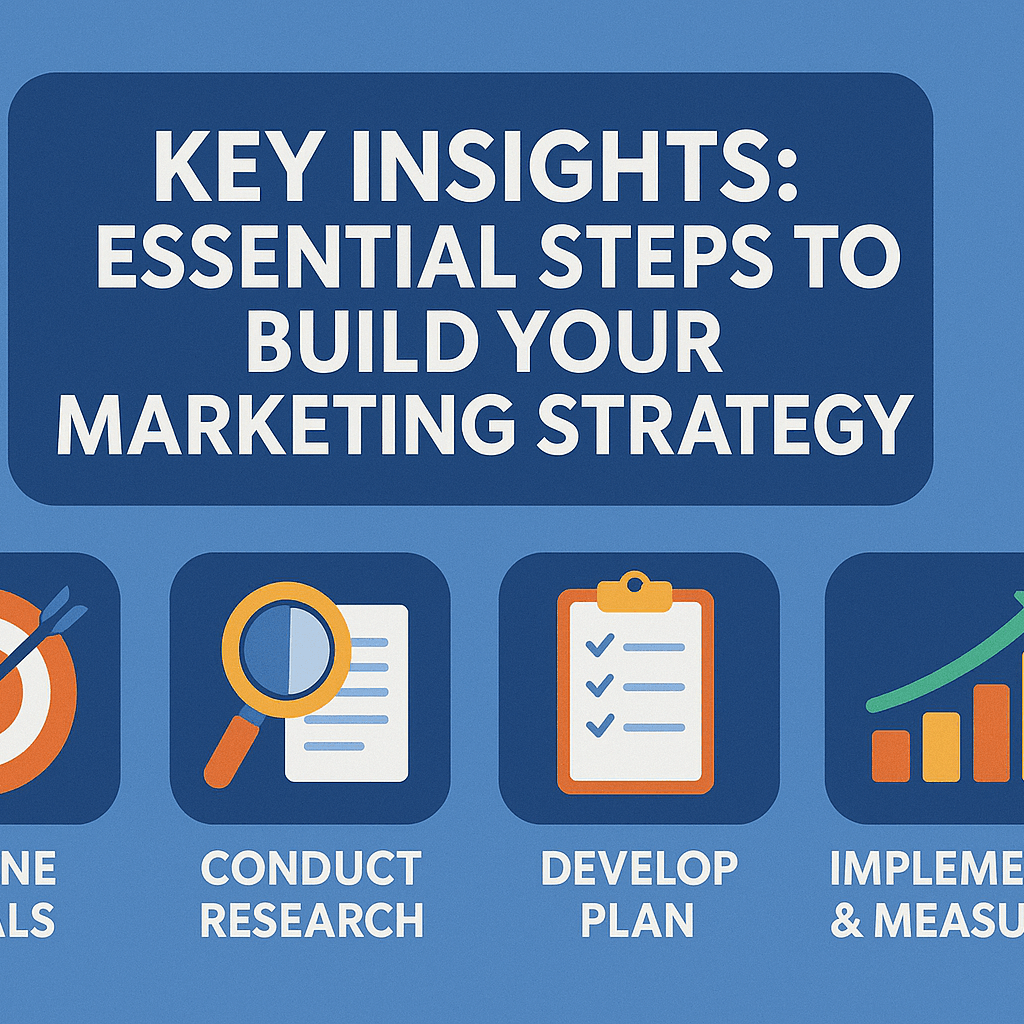
Key Insights: Essential Steps to Build Your Marketing Strategy

🔍 Step 1: Set Clear Objectives & Goals

Define what success looks like. Do you want brand awareness, leads, or sales?

  • Beginners: “Get followers.”
  • Pro Tip: Use SMART goals e.g., “Acquire 500 email subscribers in 3 months.”

🎯 Step 2: Know Your Audience & Personas

“Start by creating detailed personas that include name, demographics, pain points, and triggers. As a result, you’ll transform vague, generic messaging into sharp, targeted communication that resonates with your ideal audience.”


🧰 Step 3: Perform Competitive & Market Analysis

Start by mapping out both direct and indirect competitors. Then, analyze their messaging, positioning, and weaknesses. As you do, you’ll begin to uncover your unique edge in the market.”
. blog.visual-paradigm.com+13blog.hubspot.com+13venngage.com+13


4. Build Your Marketing Mix (4 P’s)


5. Channel & Tactic Selection

Choose tactics tied to audience behavior:


6. Budget & Resource Allocation

Ranges from DIY guerrilla tactics to paid campaigns. Start lean—test before scaling on your top-performing tactics. smallbiztrends.com+8blog.hubspot.com+8voguebusiness.com+8


7. Set KPIs & Track Performance

To ensure measurable progress, match each goal with clear KPIs such as Customer Acquisition Cost (CAC), conversion rate, ROI, and Marketing Qualified Leads (MQLs). Then, track your performance using tools like Google Analytics or HubSpot. This allows you to refine your tactics continuously and optimize results over time.


8. Optimize & Iterate

Marketing isn’t static. Use data to:


Fresh Perspective: AI +Marketing Strategy = Supercharge

2025 sees AI powering smarter, faster marketing.
According to HubSpot, 43% of marketers use AI for content creation, and 30% for data insights deloittedigital.com+8blog.hubspot.com+8nielsen.com+8.

How I Use AI in markerting strategy:

  1. Content idea generation – start with prompts, fine-tune for our voice
  2. Audience insight mining – clustering user feedback
  3. Ad optimization – AI suggests better headlines
  4. Personalization at scale – mix AI drafts with a real touch

Marketing Strategy Insights from Industry Leaders


Sample Beginner Marketing Strategy: Real-World Flow

Goal: 300 leads in 90 days
Audience: 25–35 yr old digital entrepreneurs needing branding tips
Competitor Insight: Major guides, but no bite-sized video tips
Tactics: Weekly YouTube shorts, 2 blog posts, lead magnet, email funnel
Budget: $200/month ads, no outsourcing
KPIs: Subs, landing page conversion, email open rate
Process: Bi-weekly review, AI content support + manual refinement


Conclusion: Start Smart, Scale Fast

By developing a thoughtful marketing strategy, you can ultimately set your brand on the path to consistent, long-term success. To achieve this, you must effectively blend classic frameworks with data-driven insights. Furthermore, by integrating modern tools like AI, you’ll not only move beyond guesswork but also start making confident, strategic decisions that consistently drive measurable results.”


💡 Call to Action

What’s the hardest part of building a marketing strategy for you? Drop your challenge in the comments and don’t forget to share this post with other beginners. If you’re looking for a free template, I can send you mine just ask Contact Us


Did this guide light a spark? For more marketing insights, check out my other posts on content and email strategy.

pay-pay-click

Pay Per Click Tips: Boost ROI and outsmart your competition

You’ve probably heard it a hundred times pay per click (PPC) advertising is one of the fastest ways to drive traffic to your website. But behind the click lies a far more complex strategy that determines whether you’re burning cash or scaling profits.

In a world where attention spans are short and competition is fierce, PPC advertising offers businesses instant visibility but only if done right. So how do you make sure your ad isn’t just a digital ghost in the crowd?

Let’s peel back the layers of PPC: the platforms, the strategies, the ROI, and the real stories from behind the scenes.


What Is Pay Per Click Advertising?

At its core, pay per click is a digital advertising model where advertisers pay a fee each time their ad is clicked. It’s essentially a way to buy visits to your site, rather than earning them organically.

The most common PPC platforms include:

  • Google Ads (formerly AdWords)
  • Microsoft Advertising (formerly Bing Ads)
  • Facebook Ads, Instagram, LinkedIn, and Twitter Ads

In PPC, advertisers bid for ad placement in a search engine’s sponsored links. For example, when someone searches “best running shoes,” Nike or Adidas might appear at the top of the results—if they’ve bid well and structured their campaign correctly.


Pay Per Click vs. SEO: Which Should You Prioritize?

FactorPPCSEO
SpeedInstant trafficLong-term growth
CostPay for each clickFree (but time/resource-intensive)
PositionTop of page instantlyEarned through optimization
ControlFull control over message and placementLess control, depends on Google’s algorithm
ConversionHighly targetedTypically broader, may need nurturing

Quick Insight: PPC and SEO work best together. While SEO builds brand authority over time, PPC gives you the boost you need when launching products, testing keywords, or capturing high-intent users right away.


How Pay Per Click Advertising Really Works

Understanding PPC means diving into the mechanics:

1. The Auction Process

Every time someone searches a keyword, a real-time auction happens. Google evaluates:

  • Your bid amount
  • Ad relevance
  • Landing page quality
  • Expected click-through rate (CTR)

The result is the Ad Rank, which determines your position on the page.

👉 Pro Tip: A higher Quality Score can lower your cost per click (CPC) while improving ad placement. Learn more about Google’s Ad Rank system here.

2. Keyword Targeting

Successful campaigns start with understanding search intent. It’s not just about choosing high-volume keywords it’s about selecting the ones that match what your ideal customer is looking for.

There are four key keyword match types:

  • Broad match
  • Phrase match
  • Exact match
  • Negative keywords

Using them strategically helps you filter out irrelevant traffic and focus your budget.


Real-World Example: Pay Per Click Success on a Small Budget

A freelance digital marketer I know ran a Google Ads campaign for a local yoga studio with just $300/month. Instead of bidding on broad terms like “yoga classes,” she used hyper-local, long-tail keywords like “affordable yoga classes in Oakland”.

The result?

  • 2.6x return on ad spend (ROAS)
  • 50% increase in first-time bookings
  • 30% lower CPC than industry average

The lesson: It’s not about how much you spend, but how smart you spend it.


Common Mistakes That Tank pay per Click Campaigns

Despite its potential, many advertisers waste thousands due to avoidable errors.

❌ Targeting Too Broad

Broad keywords like “marketing” or “shoes” burn budget quickly and attract unqualified clicks.

❌ Poor Landing Page Experience

You’ve paid for the click—don’t lose the user at the landing page. Pages must:

  • Load fast
  • Match the ad message
  • Offer clear CTAs

Use tools like Google PageSpeed Insights to evaluate and improve.

❌ Set-and-Forget Mentality

PPC requires continuous optimization. That includes:

  • A/B testing ad creatives
  • Adjusting bids based on device/location
  • Monitoring keyword performance

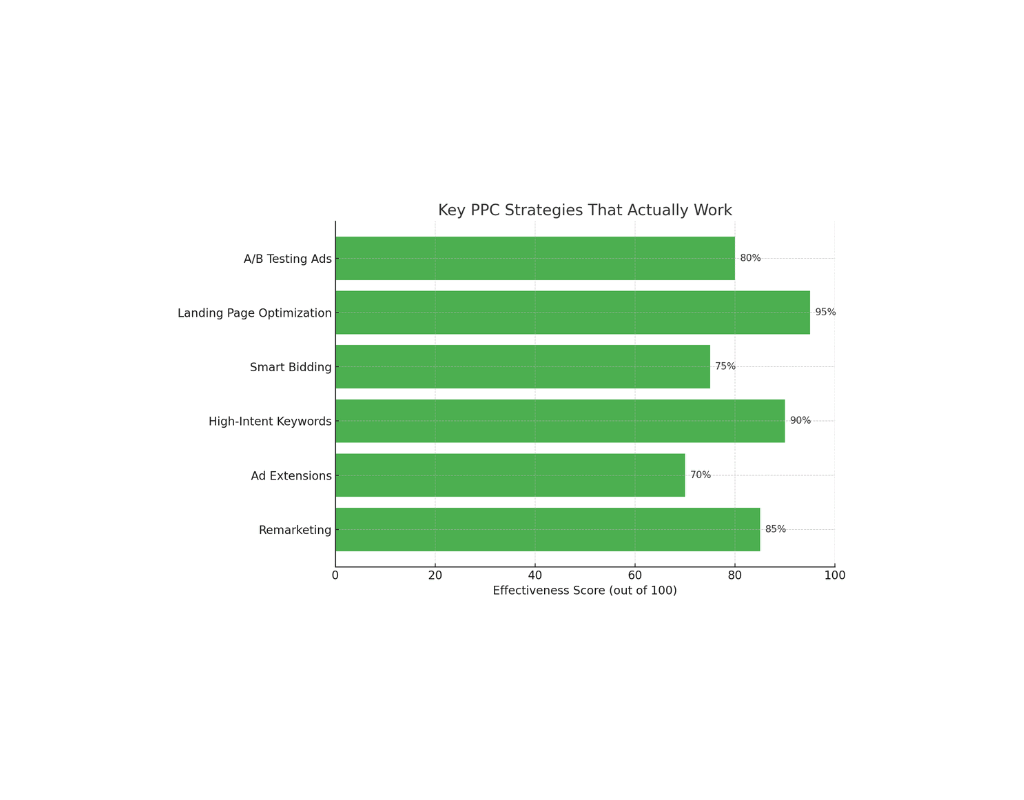
Key PPC Strategies That Actually Work

✅ 1. Leverage Remarketing

Use remarketing to re-engage users who’ve visited your site but didn’t convert. It often delivers lower CPCs and higher conversion rates.

✅ 2. Test Ad Extensions

Ad extensions (like sitelinks, callouts, and location info) improve ad visibility and CTR—without costing extra per click.

✅ 3. Focus on High-Intent Keywords

Use tools like Ahrefs, SEMrush, or Google’s Keyword Planner to uncover keywords that indicate buying intent (e.g., “buy,” “near me,” “best,” “discount”).

✅ 4. Automate Smart Bidding (But Monitor It)

Google’s AI-driven Smart Bidding strategies can help optimize for conversions—but always review results manually.


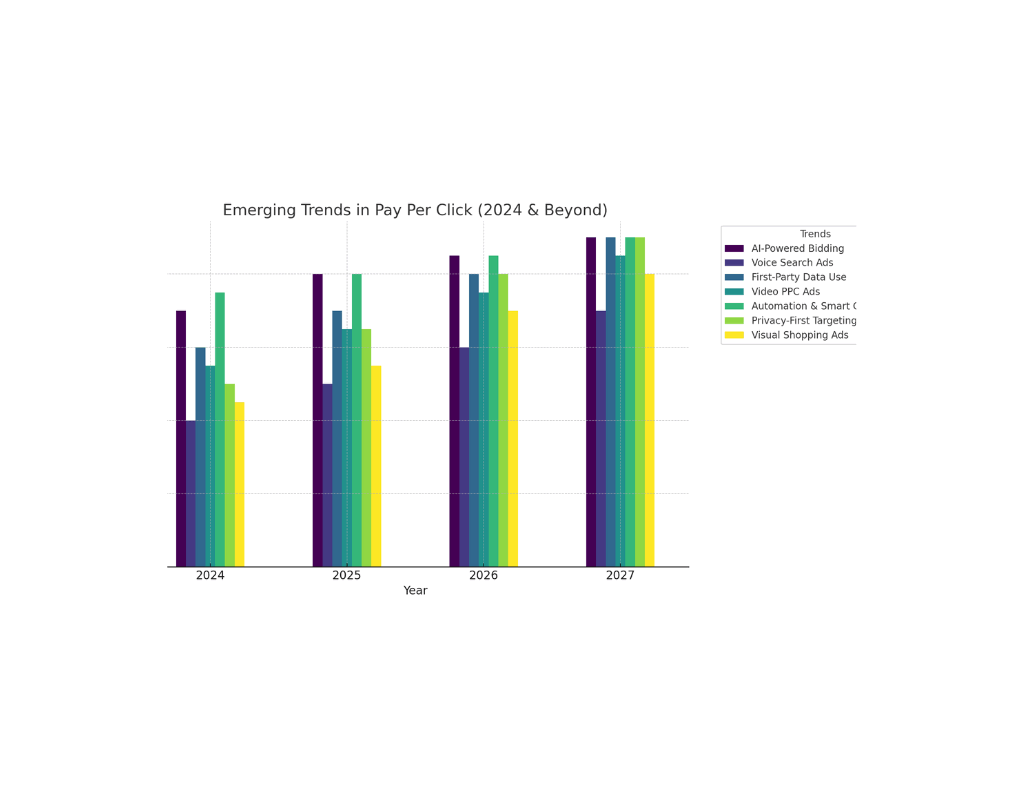
Emerging Trends in Pay Per Click (2024 & Beyond)

The PPC landscape is shifting rapidly. Here’s what you should watch:

📈 Automation & AI

Google is leaning heavily into automation. Responsive search ads (RSAs) now outperform expanded text ads, and machine learning is optimizing bids in real-time.

🛒 PPC on E-Commerce Platforms

Amazon Ads, Walmart Connect, and even TikTok Shop are becoming powerful PPC channels for product-based businesses.

🔍 First-Party Data Is Gold

With third-party cookies fading out, leveraging your own data (via email lists, CRM integrations, etc.) will help you build stronger PPC audiences.


Should You DIY or Hire a PPC Expert?

This depends on your:

  • Budget
  • Time availability
  • Complexity of your offer

If you’re running a local campaign or experimenting, DIY can work using platforms like Google Ads Express or Meta Ads Manager. For larger or ongoing campaigns, a professional or agency can prevent budget waste and drive better results.


Final Thoughts: Is Pay Per Click Worth It?

Absolutely if approached strategically.

Pay per click gives you precision, speed, and measurable ROI. But it’s not magic. It’s a system that demands testing, optimization, and a clear understanding of your audience.

With the right setup, even small businesses can compete with bigger brands—and sometimes even outbid them with smarter, more targeted campaigns.


💡 Ready to Get Started with PPC?

Here’s what you can do right now:

  • ✅ Set up a free Google Ads account
  • ✅ Try a test campaign with a $50–$100 budget
  • ✅ Use keyword tools to research what your customers are really searching for
  • ✅ Optimize your landing page for conversions
  • ✅ Bookmark this blog and share it with a friend who’s ready to dive into digital advertising

📣 Have You Run a PPC Campaign Before?

Tell us your wins or mistakes in the comments we’d love to hear your experience. Or subscribe to our newsletter for weekly tips on digital growth strategies that actually work. Contact Us


social-media-manager

Social Media Manager: More Than Just Posting Content

In a world where attention spans are shorter than TikTok loops, being a social media manager involves far more than just posting pretty pictures or writing witty captions. To begin with, it’s about strategic thinking, brand storytelling, crisis control, and analytics. Moreover, it requires staying ten steps ahead of ever-shifting algorithms. In fact, if you think social media management is just “playing on Instagram,” then this post is about to completely change your perspective.

The Evolution of the Social Media Manager Role

Once upon a digital time, managing a Facebook page and tweeting occasionally was enough. Fast forward to 2025, and the social media manager is part data analyst, part content strategist, part customer service agent, and 100% brand guardian.

Then vs. Now: Key Differences

Role ElementThen (2010s)Now (2020s)
Platforms UsedMainly Facebook, TwitterInstagram, TikTok, LinkedIn, Threads, etc.
Main GoalEngagement & followersROI, conversions, multi-channel strategy
Skills NeededCopywritingVideo editing, data analysis, brand voice
Tools UsedBasic schedulersAI tools, CRM platforms, social analytics

Today’s social media manager is expected to wear many hats, often in a single day. It’s not unusual to go from designing a carousel in Canva to analyzing TikTok trends to responding to customer complaints all before lunch.

The Strategic Backbone of a Brand

A good social media manager isn’t reactive; they’re proactive. They work with the marketing team to plan campaigns that support business objectives, understand what content works best for each platform, and use insights to fine-tune the strategy.

Key Responsibilities of a Social Media Manager:

  • Content Strategy: Planning posts based on data, seasonal trends, and audience behavior.
  • Community Management: Engaging with followers, responding to DMs and comments.
  • Analytics & Reporting: Using tools like Sprout Social or Google Analytics to track success metrics.
  • Trendspotting: Staying ahead of algorithm updates and viral content.
  • Collaboration: Coordinating with design, copywriting, sales, and customer service teams.

Real Talk: My Experience in the Trenches

When I started managing social media for a small e-commerce brand, I thought it would be mostly content creation. I quickly realized the depth of the role. In one week,

  • Launched a last-minute promo campaign due to an inventory spike
  • Handled a mini-PR crisis from a misinterpreted tweet
  • Reported a 32% increase in conversions from a viral Reel
  • Updated our LinkedIn strategy to target B2B clients

These aren’t outliers they’re the norm. The modern social media manager is a digital Swiss Army knife.

Tools That Save Sanity (and Time)

There are countless tools out there, but here are a few that most social media managers swear by:

Content Creation & Scheduling

  • Canva Pro – For quick, beautiful graphics
  • Later / Buffer / Hootsuite – Scheduling and basic analytics

Analytics & Insights

  • Google Analytics – Track traffic and conversions
  • Meta Business Suite – Manage Facebook & Instagram ads + insights
  • Sprout Social or SocialBee – Advanced insights and reporting

Trend Tracking

  • Exploding Topics – For emerging trends
  • TikTok Creative Center – For trending sounds and formats

Fresh Perspectives: What Sets Top Social Media Managers Apart

A great social media manager does more than follow best practices they understand why certain things work. Here are some qualities and habits that elevate the best:

  • Audience Empathy: They deeply understand their audience’s desires and pain points.
  • Agility: Quick to pivot strategies based on performance data.
  • Experimentation: Willing to test and learn without fear of failure.
  • Consistency: Brands don’t go viral overnight. Consistent effort beats short-term tactics.

SEO Meets Social: A Growing Connection

With platforms like Google indexing social posts, and YouTube and TikTok doubling as search engines, SEO and social are increasingly intertwined. A smart social media manager:

  • Uses search-friendly captions and hashtags
  • Collaborates with SEO teams on content calendars
  • Analyzes social insights to inform keyword strategies

How to Become a Social Media Manager (or Get Better at It)

Whether you’re starting out or leveling up, here’s a roadmap:

1: Learn the Basics

2: Build a Portfolio

  • Manage your own brand or volunteer for small businesses
  • Show before/after metrics and campaign examples

3: Stay Current

  • Follow leaders like Matt Navarra, Rachel Karten, and The Social Media Geekout newsletter

4: Get Certified

  • Consider Meta Blueprint or Hootsuite certifications to boost credibility

Conclusion: Why the Social Media Manager Role is Here to Stay

The digital landscape isn’t slowing down, and neither is the need for human-centered storytelling. A skilled social media manager isn’t just a content poster they’re a brand builder, growth strategist, and digital first responder.

If your business underestimates this role, you’re likely leaving serious growth on the table.

🚀 Ready to take your brand’s social media to the next level?

Whether you’re hiring, training, or becoming a social media manager, the future belongs to those who understand the power behind the post. Let’s start that journey together.

👇 Have thoughts or questions? Contact Us

onsite-and-offsite-seo

Onsite and Offsite SEO Ranking Smarter

Why SEO Is More Than Just Keywords

Imagine pouring your heart into an amazing website or product, but hardly anyone finds it online. That’s where onsite and offsite SEO come in. They’re two sides of the same coin, and when balanced correctly, they can drive consistent, high-quality traffic to your site.

But here’s the catch: most businesses tend to lean too heavily on one and ignore the other. This post dives into the nuances of both onsite and offsite SEO, why you need both, and how to put them to work for your brand.


What Is Onsite SEO?

Onsite SEO, also known as on-page SEO, refers to all the optimization strategies you apply within your website to improve its visibility to search engines and users.

Key Elements of Onsite SEO

  • Keyword Optimization: Naturally integrating target keywords in titles, headers, and content.
  • Meta Tags: Crafting relevant meta titles and descriptions to boost click-through rates.
  • URL Structure: Clean and descriptive URLs help both users and search engines understand the page.
  • Internal Linking: Connecting related content to enhance navigation and authority.
  • Site Speed & Mobile Optimization: Core Web Vitals, as defined by Google, directly affect rankings.
  • Content Quality: Unique, informative, and engaging content tailored to user intent.

Additional Reading: Moz Beginner’s Guide to SEO

Personal Insight

I once optimized a client’s site by simply improving internal linking and rewriting meta descriptions. The result? A 38% increase in organic traffic within 2 months.


What Is Offsite SEO?

Offsite SEO (or off-page SEO) includes all actions taken outside of your website to improve its authority and visibility.

Core Components of Offsite SEO

  • Backlinks: High-quality links from reputable websites signal trust and relevance.
  • Brand Mentions: Even unlinked brand mentions can boost your site’s credibility in Google’s eyes.
  • Social Media Signals: While not a direct ranking factor, social engagement increases content reach.
  • Guest Posting: Publishing on authoritative blogs drives referral traffic and backlinks.
  • Business Listings & Citations: Ensures NAP (Name, Address, Phone) consistency across platforms.

Industry Insight

According to Ahrefs, 91% of all pages never get any organic traffic from Google, mostly due to lack of backlinks. That’s how powerful offsite SEO can be.

For deeper understanding: Search Engine Journal – Off-Page SEO Guide


Onsite vs. Offsite SEO: Key Differences at a Glance

AspectOnsite SEOOffsite SEO
Location of WorkOn your websiteOutside your website
FocusContent, structure, UXAuthority, credibility, exposure
Main ToolsCMS, SEO plugins, HTML, analyticsOutreach, PR, backlink tools (Ahrefs, SEMrush)
Control LevelHigh (you control the site)Low (reliant on external sources)
Immediate ImpactQuicker wins (e.g., site speed, keywords)Takes longer to show results

Why You Need Both: A Balanced SEO Strategy

You can have the best content in the world (onsite SEO), but without links and authority (offsite SEO), Google may never rank it. On the other hand, having tons of backlinks pointing to a slow, messy site won’t help either. In essence, both onsite and offsite SEO are crucial and interdependent.

Therefore, a balanced approach is necessary, combining high-quality content and user experience with authoritative backlinks and online presence. By doing so, you’ll be more likely to achieve better search engine rankings and drive more traffic to your site.

Would you like more details on balancing onsite and offsite SEO?

Meta AI response: You can have the best content in the world (onsite SEO), but without links and authority (offsite SEO), Google may never rank it. On the other hand, having tons of backlinks pointing to a slow, messy site won’t help either. In essence, both onsite and offsite SEO are crucial and interdependent. Therefore, a balanced approach is necessary, combining high-quality content and user experience with authoritative backlinks and online presence. By doing so, you’ll be more likely to achieve better search engine rankings and drive more traffic to your site. Would you like more details on balancing onsite and offsite SEO?

A holistic strategy means:

  • Attracting users with quality content (onsite)
  • Earning trust and authority through offsite efforts

Think of it like a job interview: onsite SEO is your resume (what you control), while offsite SEO is your references (what others say about you).


Best Practices for Onsite SEO in 2025

1. Optimize for Search Intent

Understand what users are actually searching for and craft content that satisfies that intent.

Great breakdown: Search Intent and Content Strategy by Backlinko

2. Use Schema Markup

Structured data helps search engines understand your content better and enables rich results. Tools like Google’s Structured Data Markup Helper make this easier.

3. Improve Page Speed

Use tools like PageSpeed Insights to identify bottlenecks.

4. Update Content Regularly

Google rewards freshness. Review and update key posts every 6–12 months.


Best Practices for Offsite SEO in 2025

1. Prioritize Quality Over Quantity in Backlinks

A single link from a high-authority site can outweigh dozens from low-quality blogs.

Check out: Neil Patel on Link Building Strategies

2. Leverage Digital PR

Get featured in industry publications or podcasts. This builds both backlinks and brand visibility.

3. Build Relationships

Networking with influencers, journalists, and content creators can organically lead to backlink opportunities.

Explore more on this from BuzzSumo’s Content & Influencer Research

4. Diversify Your Link Profile

Include a mix of guest posts, business directories, social profiles, and forum mentions.


Fresh Perspective: Think of SEO as a Reputation System

One thing that’s often overlooked: SEO is less about “gaming the algorithm” and more about building reputation.

  • Onsite SEO = Your content says, “I know what I’m talking about.”
  • Offsite SEO = Others say, “Yes, they do.”

When both sides match, Google listens.


Final Thoughts

Mastering onsite and offsite SEO isn’t about chasing algorithms; rather, it’s about creating value and building trust. By focusing on user experience, meaningful connections, and consistently great content, you can establish a strong foundation.

Furthermore, the best SEO results come from long-term thinking and steady execution. In other words, it’s about persistence and patience. Ultimately, this approach will yield better rankings and more sustainable growth.

Would you like more insights on SEO strategy?


What Next? 🔍

  • Have you optimized both onsite and offsite SEO strategies?
  • Need help with backlinks or content structure?

Let us know in the comments or contact us for a free site audit.

Enjoyed this post? Share it or explore our SEO case studies to see real-world results.

email-marketing

Email Marketing 2025: Boost Opens & Conversions

In 2025, the average inbox is bombarded with 143 emails daily (Statista). Yet despite inbox chaos, email marketing remains a $42 ROI machine for every $1 spent (Litmus) if you evolve with the new rules.

AI-sorted tabs like Gmail’s “Promotions” filter, Yahoo’s engagement-based algorithms, and cookie-less tracking have rewritten the playbook.

💣 The reality? 68% of emails now die unopened in the Promotions tab.

This guide breaks down 10 battle-tested tactics from brands achieving 60%+ open rates using GPT-5, AMP 2.0, and zero-party intelligence to own the inbox.


🔥 1. AI-Optimized Subject Linesi In Email Marketing Beyond Emojis

In 2025, high performers rely on predictive sentiment scoring to craft irresistible subject lines.

Example:
📉 Before AI: “New Collection Live!”
📈 After GPT-5: “Your style muse is back – 3 pieces you’ll obsess over, [Name]!”

📊 Stat: Emails with neuro-linguistic cues see a 34% lift in opens (Persado 2025).

💡 Power Tools:

  • Phrasee AI – for real-time A/B testing and live campaign optimization
  • Persado – emotional scoring engine for subject lines

Pro Tip: Avoid spammy urgency.
❌ “LAST CHANCE! 24 HOURS ONLY!”
✅ “Your cart’s VIP pricing expires at 8 PM 😉”


⏱️ 2. Email Marketing Behavioral Send-Time AI

“Tuesday at 10 AM” is dead. Smart brands now target each user’s peak window.

SubscriberBest TimeOpen Rate Lift
Mobile Gamers7:30–8:30 PM+39%
B2B Execs6:45–7:45 AM+28%
Gen Z Shoppers3–4 PM (Reels break)+45%

📈 Tool: SendTime AI uses device + behavioral data (opt-in wearables) to sync send times.

🔍 Read more on Mailchimp’s time optimization insights


✂️ 3. Email Marketing Preheaders as Micro-Conversion Engines

Turn that preview text into a click catalyst:

📉 Weak: “View our summer sale…”
🚀 Strong: “You have 82 rewards points → Redeem for $10 off!”

📊 CTR increases 23% when using emoji counters like: ✅ 12 people claimed this
(Source: Klaviyo 2025 Benchmark Report)

🎯 Master preheaders with Litmus’s preheader guide


🎯 4. Zero-Party Data Segmentation

With cookies gone, brands now ask not track user intent.

🛠️ Build segments via:

🏆 Result: Sephora’s zero-party strategy = 52% higher conversion rate.


🤖 5. GPT-5 Hyper-Personalization

Forget Hi {{First_Name}}. GPT-5 crafts contextual stories tailored to each user’s behavior.

✨ Examples:

  • “That hiking backpack you eyed in Patagonia? It’s 30% lighter now.”
  • AI-generated product previews using Midjourney and geolocation
  • Dynamic offers: “Based on your yoga routine → 20% off sweat-wicking leggings”

📈 Stat: GPT-5 personalization boosts conversions by 48% (HubSpot 2025 Trends).


🎮 6. AMP 2.0 & In-Email Marketing Actions

Your email is now the app. With AMP 2.0, users can shop, book, and try-on directly in the inbox.

FeatureLiftUse Case
AMP Cart+53%Ecommerce
Live Booking+41%Travel/SaaS
AR Try-On+62%Beauty/Fashion

🛠️ Build with:


📮 7. 2025 Email Marketing Deliverability: 3 Non-Negotiables

📬 Gmail and Yahoo now enforce:

  1. BIMI Verification (brand logos in inboxes)
  2. <0.1% Spam Complaint Rate
  3. IP Warm-Up with >45% open rates

🧰 Tools:


🔬 8. Multi-Variable Testing (MVT) 2.0

2025 marketers run multi-layered tests, not single A/B tweaks.

🧪 Example Test Matrix:

  • CTA copy: “Get Deal” vs. “Unlock My Price”
  • Hero media: Static vs. GIF vs. AMP
  • Social proof: Top vs. Near CTA

📈 Result: AMP + urgency CTA + near-CTA proof = 68% lift (Omnisend)

💡 Learn MVT testing from VWO’s complete guide


🌟 9. Trust Engineering with UGC

Combat promotions-tab blindness with authenticity:

🎥 Embed TikTok UGC
📈 Show live purchases: “12 bought this in the last hour ⏱️”
💬 Use micro-influencers: “Dr. Lee: ‘This serum transformed my clinic.’”

📊 CTA near UGC = 31% more conversions (Nielsen 2025)


🔄 10. The Post-Conversion Loop Sequence

🔁 Keep the momentum alive post-sale.

Example Flow:
→ “Love your new headphones? Add a travel case 20% off”
→ “Not vibing? Swap styles instantly no charge.”

📈 Drives 44% repeat purchases (Shopify Data 2025)
🛠️ Tools: ReConvert for Shopify loops.


📊 2025 Email Marketer’s Tech Stack

CategoryToolUse
PersonalizationPersadoEmotional scoring AI
AMP BuilderStripoDrag-and-drop AMP 2.0
DeliverabilityPowerDMARCAuthentication + BIMI
AnalyticsKlaviyo AI InsightsPredictive segmentation
TestingMail-testerDeliverability diagnostics

🎯 Conclusion: Your 2025 Inbox Breakthrough

Email is evolving fast. What still works?

AI + Human Creativity
Zero-Party, Privacy-First Strategy
In-Email Experiences that feel native


📍 Next Steps

🔍 Run a Free Deliverability Test: Mail-tester.com
🎯 Download Our AI Subject Line Generator
📅 Book a Strategy Session Contact Us


💬 Which tactic are you testing first? Tag your favorite marketing buddy below 👇